V-Model :
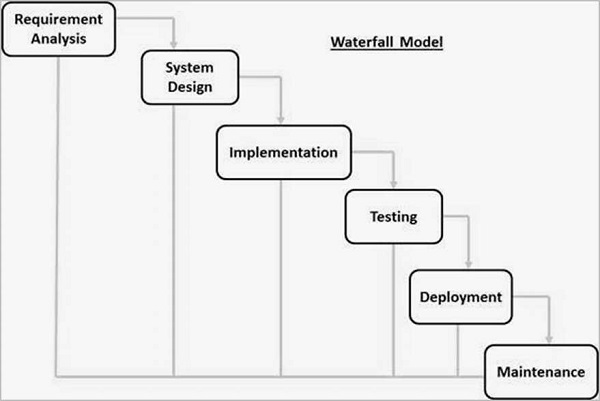
Waterfall Model లో ఉన్న ప్రధానమైన drawback ఏమిటంటే చివరి విభాగాలలో (అంటే కోడింగ్ తర్వాతి విబాగాలు ) మాత్రమే మనం testing చేస్తాం మరియు ఏమైనా defects ఉంటె at end stage లో మాత్రమే కనుగొనడం జరుగుతుంది .
- ఇలా చేయడం ద్వార time మరియు money చాల ఖర్చు అవుతుంది. దీని గురించి వివరంగా " cost to fix the defects " లో తెలుసుకోవచ్చు.
- ఇటువంటి సమస్యలను overcome చేయడం కోసం రుపొందినచిందే “V Model”
- ఇప్పుడు ఎక్కువగా వాడుతున్న software development process లో V model ఒకటి.
- దీనినే verification and validation model అని కూడా అంటారు.
V-Model గురించి తెలుసుకునే ముందుగా Verification మరియు Validation అంటే ఏంటో తెలుసుకుందాం.
Verification: ఇది ఒక static analysis technique. ఈ పద్దతిలో code execute చేయకుండ టెస్టింగ్ చేస్తాము.
Examples – Reviews, Inspection and walk-through.
Validation: ఇది ఒక dynamic analysis technique. ఈ పద్దతిలో code execute చేసి టెస్టింగ్ చేస్తాము.
Examples - functional and non-functional testing techniques.
V - Model :
- ఈ పద్దతి లో development, QA ఏకకాలం లో జరుగుతాయి.
- ఎడమ చేతి వైపు development (అభివృద్ధి ) కార్యకలాపాలు చూపిస్తుంది మరియు కుడి వైపు testing కార్యకలాపాలు చూపిస్తుంది.

ఎడమ చేతి వైపు (Left Hand side ):
ముందుగా చెప్ప్పిన విధంగా ఎడమ చేతి వైపు development (అభివృద్ధి ) కార్యకలాపాలు జరుగుతాయి.
Requirement analysis:
- ఈ విభాగం లో requirements ని collect, analyze చేస్తారు.
- ప్రాజెక్ట్ యొక్క objectives పూర్తిగా తెలుసుకోవడం కోసం Brain storming sessions/walkthrough, interviews ని జరుపుతారు.
Verification activities : Requirements reviews.
Validation activities :Creation of UAT (User acceptance test) test cases
Artifacts produced : Requirements understanding document, UAT test cases.
System requirements / High level design:
- ఈ విభాగంలో high level design of the software ని build చేస్తారు .
- requirements ని ఏ విధం గా implement చేయవచ్చో చున్నం గా పరిశిలిస్తారు.
- Hardware / software ఏమేం కావాలో ఒక నిర్ణయానికి వస్తారు.
Verification activities: Design reviews
Validation activities: Creation of System test plan and cases, Creation of traceability metrics
Artifacts produced: System test cases, Feasibility reports, System test plan, Hardware software requirements, and modules to be created etc.
Architectural design:
- ఈ విభాగం లో high level design ఆధారంగా software architecture ని రూపొందిస్తారు.
- The modules, వాటి మద్య relationships మరియు dependencies ని రూపొందిస్తారు.
- architectural diagrams, database tables ని రూపొందిస్తారు.
Verification activities: Design reviews
Validation activities: Integration test plan and test cases.
Artifacts produced: Design documents, Integration test plan and test cases, Database table designs etc.
Module design/ Low level Design:
- ఈ విభాగం లో ప్రతి module లేదా software components యొక్క design ను విడివిడిగా రూపొందిస్తారు.
- Methods, classes, interfaces, data types మొదలైనవి అన్ని ఈ దశ లో పూర్తి చేస్తారు.
Verification activities: Design reviews
Validation activities: Creation and review of unit test cases.
Artifacts produced: Unit test cases,
Implementation / Code:
- ఈ విభాగం లో అసలైన కోడింగ్ పని మొదలవుతుంది.
Verification activities: Code review, test cases review
Validation activities: Creation of functional test cases.
Artifacts produced: test cases, review checklist.
కుడిచేతి వైపు (Right Hand Side ):
ముందుగా చెప్పినట్లు కుడి చేతి వైపు testing activities లేదా Validation జరుగుతాయి.
Unit Testing:
ఈ విభాగం లో Low level design దశ లో రుపొందిన్చినటువంటి unit test case ని executed చేయడం జరుగుతుంది.
- Unit testing ఒక white box testing technique.
- ఈ testing మాములుగా development team చేస్తుంది.
Artifacts produced: Unit test execution results
Integration Testing:
ఈ విభాగం లో Architectural design దశ లో రుపొందిన్చినటువంటి integration test cases ని executed చేయడం జరుగుతుంది.
- Integration Testing ఇందులో unit tested modules ని integrate చేసి టెస్ట్ చేస్తారు.
- expected results వస్తునాయో లేదో పరిశిలిస్తారు.
Artifacts produced: Integration test results.
Systems testing:
అసలైన టెస్టింగ్ ఈ దశ లోనే మొదలవుతుంది అన్ని system test cases, functional test cases మరియు nonfunctional test cases
execute చేస్తారు.
Artifacts produced: Test results, Test logs, defect report, test summary report and updated traceability matrices.
User acceptance Testing:
- ఇది ఒక business requirements testing కి సంబంధించినది.
- ఈ దశ లో business requirements ,user environment లో expected results ని ఇస్తాయో లేదో చెక్ చేస్తారు.
- Compatibility testing మరియు sometimes nonfunctional testing (Load, stress and volume) testing ను చేస్తారు.
Artifacts produced: UAT results, Updated Business coverage matrices.
ఎక్కువ గా V Model ను ఎప్పుడు use చేయాలి ?
- Requirement is well defined and not ambiguous
- Acceptance criteria are well defined.
- Project is short to medium in size.
- Technology and tools used are not dynamic.